Deployment
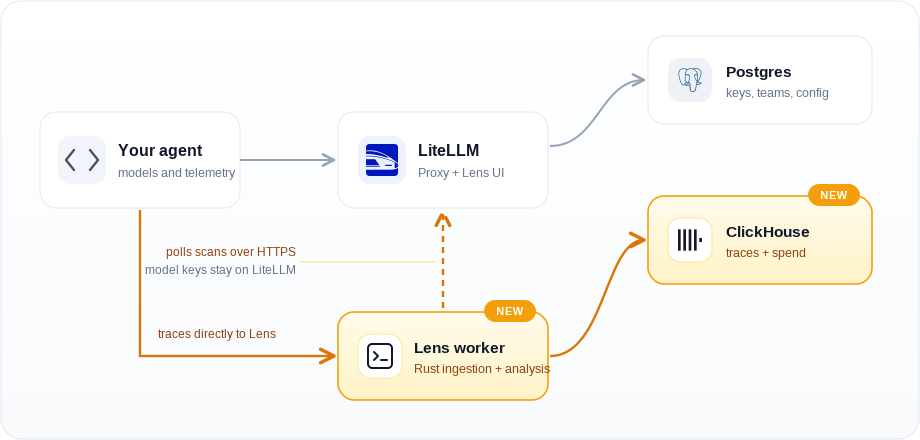
Lens records agent activity and investigates it in a separate Rust service. LiteLLM serves model requests, the dashboard, and investigation settings. Lens owns trace ingestion and ClickHouse access; PostgreSQL stays with LiteLLM
Agent exporters send traces directly to Lens. LiteLLM sends its optional request logs through a bounded background queue. If Lens or ClickHouse is unavailable, model requests continue; traces can be delayed or dropped according to the exporter's retry policy. The gateway never waits for ClickHouse during startup or inference
New local installation
Install Docker with Compose and Git, then build the gateway and Lens from one checkout:
git clone https://github.com/BerriAI/litellm.git
cd litellm
export LITELLM_RELEASE_TAG="sha-$(git rev-parse HEAD)"
export LITELLM_MASTER_KEY="sk-$(openssl rand -hex 24)"
export LITELLM_LENS_SERVICE_TOKEN="$(openssl rand -hex 32)"
export OPENAI_API_KEY='<your-provider-key>'
docker compose -f docker/docker-compose.tracing.yml up -d --build
Save the generated keys privately and reuse them when restarting or upgrading. This stack binds to localhost and uses development database passwords; use your normal secrets, TLS, backups, and ingress for a hosted deployment
Open http://localhost:4002/ui/ and sign in as admin with LITELLM_MASTER_KEY. Under Lens > Traces > Set up tracing, generate a tracing key and copy the ingestion URL. Local exporters use http://localhost:4318. Model calls keep their existing LiteLLM URL and model key
Under Lens > Investigations > Connect worker, choose an analysis model and monthly budget. The deployed service connects automatically after you save these settings. There is no worker command or second token to copy
Existing LiteLLM installation
Keep your gateway, PostgreSQL database, deployment tool, and existing encryption keys. Deploy the matching Lens image, give it access to ClickHouse, and configure the service connection on LiteLLM
| Variable | LiteLLM | Lens service |
|---|---|---|
LITELLM_LENS_SERVICE_TOKEN | Same private random secret, at least 32 characters | Same secret |
LITELLM_LENS_URL | Internal Lens URL, such as http://lens-worker:4318 | Not needed |
LITELLM_LENS_PUBLIC_URL | Ingestion base URL reachable by your agents | Not needed |
LITELLM_URL | Not needed | LiteLLM URL reachable from Lens |
CLICKHOUSE_URL | Remove it from Lens tracing configuration | ClickHouse HTTP URL with credentials |
CLICKHOUSE_DATABASE | Not needed for Lens | Existing database name, defaults to litellm |
AGENT_TRACING_RETENTION_DAYS | Not needed for Lens | Retention for traces and Lens request logs, defaults to 14 |
Remove the old general_settings.tracing.store configuration used for Lens from LiteLLM. Keep unrelated logging integrations and their configuration. Only Lens should reach its ClickHouse database. The shared service secret is an infrastructure credential: keep it out of browser code, agent exporters, screenshots, and public ingress headers
Expose the Lens HTTP listener on port 4318 through TLS. Route /lens-ingest on your existing hostname directly to Lens at the load balancer, then set LITELLM_LENS_PUBLIC_URL=https://<your-host>/lens-ingest. The gateway must not proxy these uploads. Alternatively use a separate hostname and forward /v1/ to Lens. Keep /internal/ private; it requires the service secret
Standalone Docker or a container host
Build from the same source commit and LITELLM_RELEASE_TAG as your running gateway:
export LITELLM_RELEASE_TAG='<gateway-release-identity>'
export LENS_WORKER_IMAGE='<your-registry>/litellm-lens-worker:<image-tag>'
docker build --build-arg LITELLM_RELEASE_TAG="$LITELLM_RELEASE_TAG" \
  -f deploy/lens/Dockerfile -t "$LENS_WORKER_IMAGE" .
Publish that image to a registry your host can pull from. Prefer a digest reference for hosted deployments. Public development images use ghcr.io/berriai/litellm-lens-worker-dev:sha-<full-commit>; check that the exact image exists before selecting it. An arbitrary commit may not have a published image
The image supports native amd64 and arm64. For worker-only Compose, use deploy/lens/compose.yaml with a private environment file containing LENS_WORKER_IMAGE, LITELLM_URL, LITELLM_LENS_SERVICE_TOKEN, and CLICKHOUSE_URL:
docker compose --env-file /path/to/private/lens.env \
  -f deploy/lens/compose.yaml up -d
The Compose listener binds to localhost. Your reverse proxy must reach it. On Render, run Lens as a web service with the same environment and listener port 4318, not an outbound-only background worker. Use /health/live for process health and /health/ready to check storage and tracing credentials
Lens does not need provider credentials, PostgreSQL credentials, a GPU, or the LiteLLM Python package. The image includes a small CPython runtime only for the investigator's confined calculation tool. Keep the shipped security settings, temporary filesystem, and resource limits
Kubernetes with Helm
Both helm/litellm and helm/litellm-helm support the Lens service. Keep your existing release, namespace, values, and database configuration. Create two Secrets through your normal secret manager: litellm-lens-service with key service-token, and litellm-lens-clickhouse with key url
lensWorker:
  enabled: true
  image:
    repository: <matching-worker-image-repository>
    digest: sha256:<matching-worker-image-digest>
  serviceTokenSecret:
    name: litellm-lens-service
    key: service-token
  clickhouseSecret:
    name: litellm-lens-clickhouse
    key: url
  clickhouseDatabase: litellm
  retentionDays: 14
  publicUrl: https://<your-litellm-host>/lens-ingest
Set clickhouseDatabase and retentionDays to your existing database and retention before upgrading
When the chart's main ingress is enabled, it routes /lens-ingest directly to Lens. With a custom ingress, add that route yourself. For a dedicated hostname, use lensWorker.ingress.enabled, host, className, and tls, and set publicUrl to that hostname. The chart connects LiteLLM to Lens internally and gives both services the shared secret
Update your existing component image overrides to matching builds, then use the chart from that checkout:
helm upgrade --install litellm ./helm/litellm \
  --namespace litellm -f values.yaml --wait
Use ./helm/litellm-helm if that is your existing chart. lensWorker.replicaCount scales ingestion and investigations. Each replica needs access to the same ClickHouse and gateway. Credentials refresh every 30 seconds; a newly created key may briefly receive a retryable 429. Revocations propagate on refresh, and a replica stops accepting traces when its credential snapshot reaches 90 seconds
Upgrade
Upgrade LiteLLM and Lens from the same source commit and release identity. For a coordinated published release, use its matching worker version; deploy/lens/stack.yaml starts LiteLLM, Lens, PostgreSQL, and ClickHouse for new installations. Standalone images remain available. Publishing an image does not update running containers
Keep the same databases, encryption keys, shared service secret, and public ingestion URL. Pause scheduled investigations and finish or cancel active runs, update both images through your usual deployment process, then check ingestion and run an investigation before resuming schedules. Do not run docker compose down -v
When upgrading from the Python worker, replace it with the Rust Lens service, move the existing ClickHouse connection to Lens, and configure the service URLs and secret on LiteLLM. Existing trace data remains in the same ClickHouse database; findings and settings remain in PostgreSQL. Stop the old worker. Generate dedicated tracing keys and change agent exporters to the ingestion URL. A virtual model key no longer authorizes uploads; the old gateway upload endpoints return 410 with setup guidance
If you retain an explicit LENS_WORKER_TOKEN, it remains an optional investigation credential. Normal setup uses the shared service connection and registers one managed worker identity. Configure the analysis model and billing key in the dashboard; provider keys stay on LiteLLM
Development
make lens-dev starts LiteLLM, the Rust Lens service, and the hot-reload dashboard. Set LENS_DEV_PROXY_PORT and LENS_DEV_UI_PORT to change the local ports. For containers, pass the same release identity to both builds. Unversioned or incompatible workers are refused before claiming work
After setup, send your first trace, then create an investigation